Write code, or let AI do it.
Intuitive syntax for humans, perfectly understood by AI. A few lines produce professional vector graphics.
import { Figure } from 'figcraft'

const fig = new Figure(700, 900, { bg: '#fff' })

const W = 150, HA = 55, HF = 48, HN = 30, GAP = 20
const EX = 60, DX = 380

const cAttn = { fill: '#fff3e0', color: '#333' }
const cNorm = { fill: '#fffde7', color: '#333' }
const cFF   = { fill: '#e8eaf6', color: '#333' }
const cEmbed = { fill: '#fce4ec', color: '#333' }

// ── Output ──
const softmax = fig.rect('Softmax', {
  pos: [DX, 30], size: [W, 32],
  fill: '#b2ebf2', radius: 4,
})
const linear = fig.rect('Linear', {
  pos: [DX, 82], size: [W, 32],
  fill: '#c8e6c9', radius: 4,
})

// ── Decoder ×N ──
const dAN3 = fig.rect('Add & Norm', {
  pos: [DX, 148], size: [W, HN], ...cNorm,
})
const dFF = fig.rect('Feed Forward', {
  pos: [DX, 198], size: [W, HF], ...cFF,
})
const dCross = fig.rect('Multi-Head Attention', {
  pos: [DX, 286], size: [W, HA], ...cAttn,
})
const dMasked = fig.rect('Masked Multi-Head Attn', {
  pos: [DX, 381], size: [W, HA], ...cAttn,
})

// ── Encoder ×N ──
const eAN2 = fig.rect('Add & Norm', {
  pos: [EX, 261], size: [W, HN], ...cNorm,
})
const eFF = fig.rect('Feed Forward', {
  pos: [EX, 311], size: [W, HF], ...cFF,
})
const eMHA = fig.rect('Multi-Head Attention', {
  pos: [EX, 381], size: [W, HA], ...cAttn,
})

// ── Embedding ──
const eEmbed = fig.rect('Input Embedding', {
  pos: [EX, 511], size: [W, 36], ...cEmbed,
})
const dEmbed = fig.rect('Output Embedding', {
  pos: [DX, 511], size: [W, 36], ...cEmbed,
})

// ── Arrows ──
fig.arrow(eMHA, eAN1, { from: 'top', to: 'bottom' })
fig.arrow(eAN1, eFF, { from: 'top', to: 'bottom' })
fig.arrow(eFF, eAN2, { from: 'top', to: 'bottom' })

// Cross-attention: encoder → decoder
fig.arrow(eAN2, dCross, {
  from: 'top', to: 'left',
  path: 'polyline', curve: 63, cornerRadius: 12,
})

// Residual connections
fig.arrow(eMHA, eAN1, {
  from: 'left', to: 'left',
  path: 'polyline', curve: 35,
})
fig.arrow(dMasked, dAN1, {
  from: 'right', to: 'right',
  path: 'polyline', curve: 35,
})

// Groups
fig.group([eAN2, eFF, eAN1, eMHA], {
  label: 'Encoder ×N',
  stroke: { color: '#999', dash: [6, 3] },
})
fig.group([dAN3, dFF, dCross, dMasked], {
  label: 'Decoder ×N',
  stroke: { color: '#999', dash: [6, 3] },
})

fig.export('transformer.svg', { fit: true })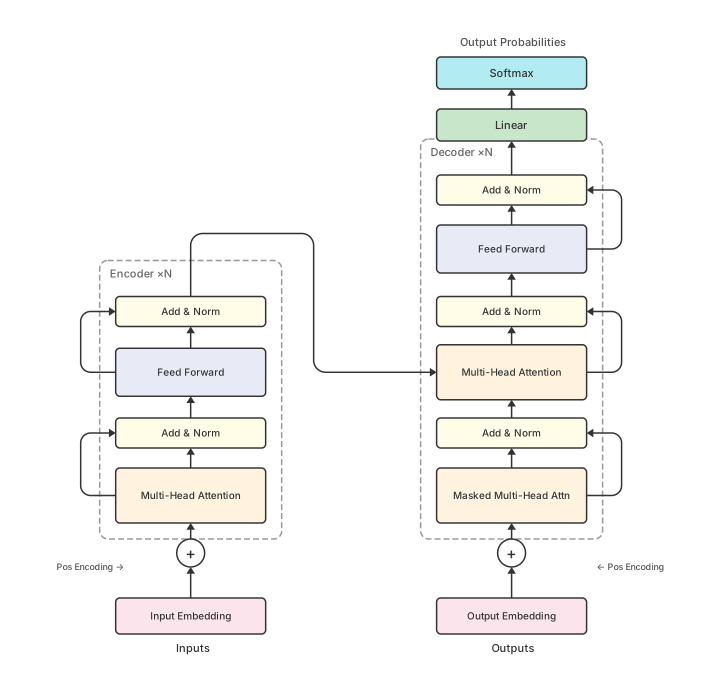
transformer.svg